
SumTotal Next
SumTotal Systems LLCBusiness
0.00.00 Reviews
- Version
- 3.4
- Installs
- 50.00K
- Age Rating
- Everyone
Screenshots
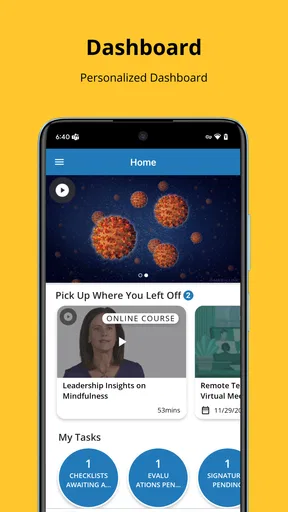
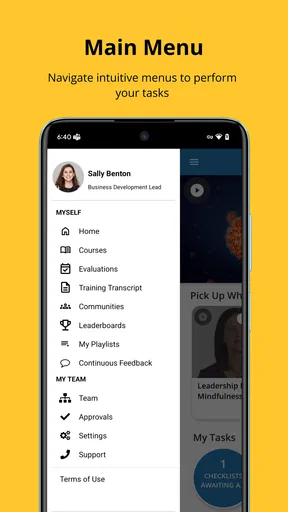
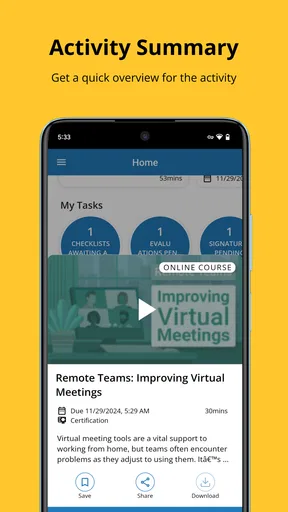
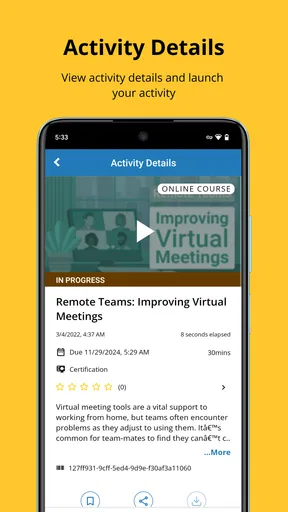
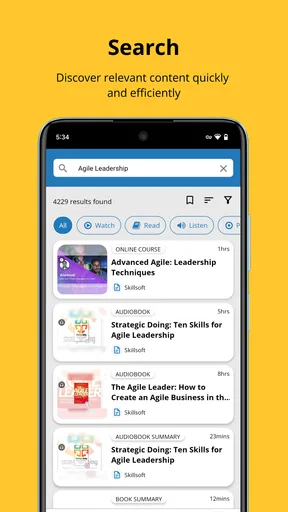
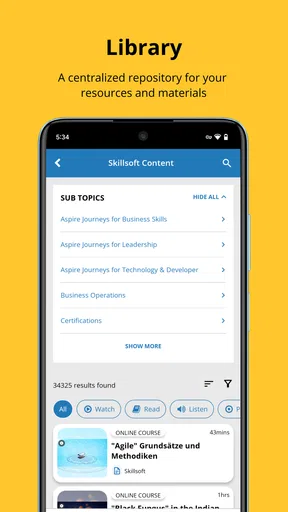
Our Review of SumTotal Next
 Analysis by Appyee
SumTotal Next is a business app from SumTotal Systems LLC that aims to make everyday access to SumTotal work information feel less complicated. After spending time with it, my impression is that its main value is not flashy functionality but a cleaner path through a professional system that can otherwise feel dense on a small screen. The app is free, rated for Everyone, and requires Android 12 or later, so it is aimed at people using relatively current devices rather than older phones.
The most important thing to understand is that this is not a general office suite or a replacement for every business tool on your phone. It is a focused companion for people whose organization already uses the SumTotal environment. If that describes you, the simplified navigation can make routine checks less tiring. If you are looking for a standalone task manager, document editor, chat app, or finance tool, this will not be the right destination.
How SumTotal Next feels when the network is part of the workflow
Business apps are judged differently from social or entertainment apps. I can tolerate a delayed image in a social feed, but I am less patient when I am trying to check a work item before a meeting or confirm information while moving between locations. SumTotal Next makes the quality of the connection an important part of the experience because its usefulness depends on reaching the organization’s SumTotal system at the moment I need it.
That changes how I approach the app. I would open it before walking into a meeting, while I still have a dependable connection, rather than waiting until I am standing in a basement, elevator lobby, or crowded venue. The interface may be easier to navigate than a traditional business portal, but a simpler interface cannot remove delays caused by a weak network or a service that is temporarily unreachable.
In a normal office setting, this is a sensible arrangement. I can connect to the company network or a reliable mobile signal, open the relevant area, and spend less time searching through menus. The app’s store summary emphasizes a more intuitive interface and simplified navigation, and that description matches the practical benefit I noticed: the effort shifts away from figuring out where to go and toward completing the work itself.
There is a useful distinction here. Better navigation reduces decision friction, not connectivity friction. If a page takes time to load, the app cannot make the network faster. What it can do is make the next action clearer once the page appears. For employees who repeatedly visit the same parts of a business system, that difference can add up across a workday.
What I would do before relying on it during a busy day
My advice is to test the app in the exact conditions where you expect to use it. Do not judge it only from a quiet desk with excellent Wi-Fi. Try opening the areas you normally need while moving between rooms, switching from Wi-Fi to mobile data, or working from a location with a less predictable signal. This is especially important if your job involves travel, multiple sites, or time-sensitive approvals.
I would also build a simple habit around the connection: open the app early, allow the relevant screen to finish loading, and avoid leaving the first attempt until the moment a manager or colleague is waiting. That is not a criticism unique to this product; it is a realistic way to use any connected business application. With SumTotal Next, the habit matters because the app is most valuable when it gives quick access to live work information rather than acting as a place to browse casually.
One subtle advantage of a focused mobile interface is that it can reduce the number of unnecessary trips through the system. On a desktop, a large screen makes it easy to keep several pages open, but it also makes it easy to wander through menus. On a phone, a clearer route is more important. If the app gets me to the needed destination with fewer taps, a short connection delay feels more manageable because I am not waiting through several unrelated screens.
Using it in real mobile situations
A realistic example would be a supervisor moving between work areas who needs to check a business item before responding to a colleague. Instead of finding a computer, signing into a wider desktop environment, and navigating a full portal, the supervisor can try the mobile route first. The benefit is not that the phone becomes a complete office; the benefit is that a focused screen may be enough for a quick decision.
I see similar value for an employee commuting between locations, provided the person has a dependable connection and the organization has configured the surrounding SumTotal service appropriately. The app can fit into short gaps in the day: before a shift begins, while waiting for a meeting, or after receiving a question that cannot wait until returning to a desk. These are moments when a complicated interface feels disproportionately frustrating.
At the same time, I would not recommend treating a phone as the best place for extended administrative work. A small display is fine for checking information and handling concise actions, but it is less comfortable for comparing many records, composing long notes, or keeping several pieces of context visible. When the task becomes analytical rather than transactional, the usual desktop experience is likely to remain better.
This is where the app’s category matters. SumTotal Next belongs in the business productivity space, but it should be viewed as a mobile access point rather than a universal productivity replacement. People who expect a full spreadsheet, a broad document workspace, or a team chat timeline may feel restricted. People who want a more direct route into their existing business workflow are more likely to appreciate its purpose.
What happens when a request fails?
Connectivity problems are not always obvious. A failed request can come from a weak signal, a change between networks, an expired session, or a temporary issue on the service side. From a user’s perspective, these situations can look similar: a screen may take too long, fail to refresh, or leave me unsure whether an action completed. That uncertainty is more serious in a business app than in a casual browsing app.
My safest approach is to pause before repeating an action. If I am submitting or changing something important, I would first check whether the screen has updated or whether the surrounding workflow shows the action as completed. Tapping repeatedly can create confusion when the connection is slow. A better recovery routine is to wait briefly, verify the result, and then try again only when I know the first attempt did not go through.
If the app stops responding during a network change, I would move to a stable connection and reopen the relevant area rather than assuming that the previous screen still represents current information. This is one of the practical trade-offs of mobile access: the interface is convenient precisely because it travels with me, but the network also changes more often when I travel with it.
Another useful habit is to separate “I cannot reach the service” from “I cannot find the feature.” Simplified navigation should help with the second problem, but it cannot solve the first. If the app opens normally yet a particular request fails, I would avoid immediately blaming the menu structure. If the interface is responsive but the content does not arrive, the connection or the underlying business service deserves attention first.
For support teams, this distinction can make troubleshooting more efficient. When reporting a problem, I would note whether the app launched, whether navigation worked, whether the failure happened during loading or after an action, and whether changing networks altered the result. That kind of description is more useful than simply saying that the app was broken.
Keeping mobile data use under control
People often think of data-conscious use only in terms of cost, but it also matters for reliability. A weak mobile connection can be slower and less consistent than a trusted Wi-Fi network, especially when the app is being used in a crowded area. I would therefore use Wi-Fi for longer sessions whenever it is appropriate and reserve mobile data for short, purposeful checks.
The app’s focused role helps here. I do not need to open it repeatedly just to browse for entertainment. A more disciplined workflow is to decide what I need before launching it, go directly to that area, confirm the information, and close the session when finished. This reduces unnecessary loading and makes the phone experience feel more deliberate.
There is also a privacy angle to consider in everyday use. A public network may be convenient, but business information deserves the same care on a phone as it receives on a computer. I would avoid using an unfamiliar connection for sensitive work when a trusted alternative is available, and I would pay attention to whether I am viewing workplace information where other people can see the screen. These are usage precautions rather than special claims about the app, but they are especially relevant when a business system becomes portable.
For employees with limited mobile data, the best routine is to use the app for targeted access rather than leaving it open while doing unrelated tasks. If a workflow requires repeated refreshes or long reading sessions, a desktop connection may be the more sensible choice. The phone is strongest when it answers a specific need quickly, not when it is forced to imitate a full workstation.
Who should install it, and who should skip it?
I would recommend SumTotal Next to employees, supervisors, and other business users who already depend on SumTotal and want a less cumbersome mobile route into that environment. The app is particularly appealing if you regularly move away from a desk, need occasional access during the day, or find a conventional business portal awkward on a phone.
I would skip it if I do not use SumTotal through work. Installing a specialized business companion without access to the relevant organization’s setup is unlikely to provide much value. I would also choose a different kind of app if my main goal were personal task planning, shared messaging, file editing, customer relationship management, or offline note-taking. A clearer interface does not turn this product into those tools.
Users on older phones should check compatibility before planning around it because Android 12 is the minimum operating system. That requirement is reasonable for a current business app, but it does exclude devices that still handle simpler workplace tools comfortably. On supported hardware, the app is free to download, which removes one barrier for employees evaluating it for routine work access.
The age rating is Everyone, so the app does not present itself as restricted entertainment or mature content. In practice, the more important suitability question is organizational access: whether it fits the business system and responsibilities of the person using it. A general audience rating does not mean every user will find it useful.
How it compares with the usual alternatives
The obvious alternative is a mobile browser pointed at the organization’s existing business portal. A browser can be flexible and avoids adding another dedicated app, but it may require more searching, more page transitions, and more adjustment to a desktop-oriented layout. SumTotal Next’s advantage is the possibility of a more direct, purpose-built route through the same kind of work environment.
A second alternative is simply waiting until a computer is available. That remains better for long sessions, complex comparisons, and work that benefits from a large screen. SumTotal Next earns its place when waiting is inconvenient and the task is short enough to complete responsibly on a phone. I would not frame it as a battle where the mobile app replaces the desktop; the strongest setup uses each for what it handles best.
General productivity apps also have a different role. A notes app may be faster for capturing an idea, and a messaging app may be better for asking a colleague a quick question. Neither necessarily provides the authoritative business context that a connected SumTotal workflow is intended to provide. The trade-off is specialization: general apps are broader, while this one is more relevant when the work already lives inside SumTotal.
That specialization also explains why the interface matters so much. A general app can afford to expose many independent functions because users choose what they need. A business companion has to guide users through an established process without making every screen feel like a technical manual. In my view, SumTotal Next is most convincing when it reduces that sense of being lost, especially during short mobile sessions.
Version, support expectations, and everyday reliability
The current version is 3.4, and the app was released on September 21, 2025. Those details place it in a relatively current stage of its product life, but they should not be mistaken for a promise that every organization will offer the same experience. Business applications often depend on how an employer’s system is configured, what permissions a user has, and which workflows the organization actually uses.
That means two colleagues can have different impressions even when they install the same app. One may find the navigation immediately useful because the needed work areas are available, while another may encounter access limits or a workflow that is not part of their role. Before judging the app harshly, I would confirm whether the issue is the mobile interface itself or the account and business setup behind it.
I would also keep the app updated through normal device maintenance, particularly when relying on it for work. A current version is a sensible starting point for troubleshooting because it avoids spending time diagnosing behavior that may already have been addressed. Still, updates cannot compensate for an unavailable service or an unreliable connection, so expectations should remain practical.
One of the less obvious strengths of a simplified business app is the effect on training. A new employee who only needs to perform a few mobile actions may not need to learn the entire desktop portal immediately. A more focused route can make occasional access less intimidating. The limitation is that simplification can hide context; anyone making a consequential decision should still understand the underlying business process rather than relying on a convenient screen alone.
My connectivity verdict
After looking at the app through the lens of real mobile use, I see SumTotal Next as a practical companion for people already tied to the SumTotal business environment. Its strongest contribution is a more approachable path through work information when I am away from a desk. The free price and current Android requirement make it straightforward to try for users with compatible devices, while its Everyone rating keeps the product broadly accessible from a content perspective.
Its limits are equally clear. It is not a substitute for a desktop when the work is detailed, and it cannot guarantee a smooth session when the network is unstable. I would plan important actions around a reliable connection, verify results after interruptions, and use mobile data selectively. Those habits do not diminish the app; they reflect the reality of using a connected business system on a phone.
My recommendation is simple: install it if your work already runs through SumTotal and you want quicker mobile access, but skip it if you need a general-purpose productivity app. In that specific situation, the simplified navigation is meaningful rather than cosmetic. SumTotal Next is at its best when it helps me reach a known business task quickly, confirms that task over a dependable connection, and lets me return to the rest of the day without needing a computer for every small check.
For that audience, I would give it a fair trial in both strong and weak-signal locations before making it part of a critical routine. If it consistently gets me to the right place with less searching, it earns a permanent spot on my phone. If my work requires extended editing, broad collaboration, or dependable access in areas with poor connectivity, I would keep the desktop or browser workflow as the primary option and treat the app as a convenience rather than the foundation.
Verdict
Strengths of SumTotal Next
- Mobile access lets users review learning tasks away from their desk.
- A single app can keep courses, assignments, and training updates together.
- Useful for organizations managing structured employee development programs.
- Progress visibility can help learners track outstanding training requirements.
- Work-related learning information is available through a familiar mobile interface.
Limitations of SumTotal Next
- Access and available features may depend on your employer’s SumTotal setup.
- The app is unlikely to be useful without valid organizational login credentials.
- Some training content may still require a browser or desktop experience.
- Notifications can become distracting when many courses or reminders are assigned.
- Performance may vary with company servers, permissions, and network connectivity.
Similar Picks in This Category
View All
LinkedIn: Community & Network
LinkedIn3.8

Zoom Workplace
zoom.com4.1

Microsoft Teams
Microsoft Corporation4.6

Meta Business Suite
Meta Platforms, Inc.4.6

Webex Meetings
Cisco Systems, Inc.4.5

TeamViewer Remote Control
TeamViewer4.4
Frequently Asked Questions
What is SumTotal Next used for?
SumTotal Next is a mobile learning and talent-management companion designed to help employees access assigned training, courses, learning resources, and professional-development activities from a smartphone or tablet. Depending on how an organization has configured the platform, users may also be able to view learning plans, complete assessments, track progress, and receive notifications about required training or upcoming activities.
Can I use SumTotal Next without an employer or school account?
Usually, no. SumTotal Next is generally connected to an organization’s SumTotal learning environment, so you normally need valid credentials provided by your employer, educational institution, or another organization using the service. Downloading the app alone does not create an independent account. If you cannot sign in, your organization’s administrator or help desk will usually need to confirm your account, server details, or access permissions.
Does SumTotal Next support offline learning?
Offline availability depends on the course and on the configuration selected by your organization. Some learning materials may be downloadable for later viewing, while interactive lessons, tests, progress synchronization, video content, or compliance activities may require an internet connection. Before relying on offline access, open the specific course while connected and check whether it offers a download or offline option.
What features can I expect after signing in to SumTotal Next?
The features shown in SumTotal Next can vary significantly between organizations because administrators control the platform setup. In general, the app may provide access to assigned courses, catalogs, learning history, due dates, notifications, certificates, and progress information. Some accounts may also include collaboration tools, instructor-led training details, performance-related resources, or personalized recommendations, but not every user will see all of these options.
Is SumTotal Next safe to download and use?
SumTotal Next is intended for organizational learning and is distributed through official mobile app stores, but safe use also depends on downloading the genuine application and keeping it updated. Review the developer information, requested permissions, and your organization’s privacy policy before signing in. Because the app may handle work-related learning records and personal account information, avoid sharing credentials and do not use unofficial download websites.
